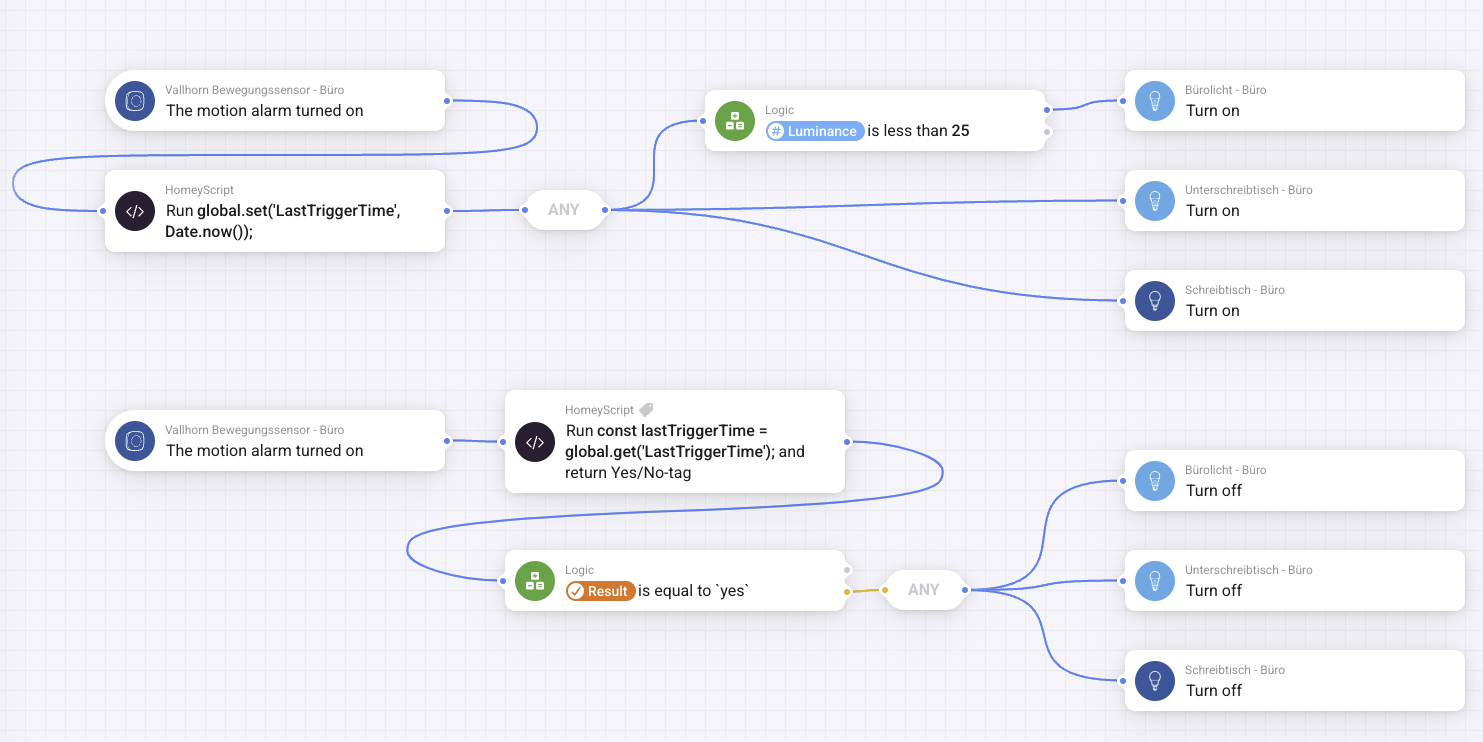
Yesterday I posted about my journey to automate the lights in my office room and only a few hours later, thanks to rubber ducking while writing the post and messages I received after publishing, I had a solution working that does exactly what I wanted to do. So this is now the final flow:

Turning Lights On
Once a motion is detected in the room it runs the following script to set the current timestamp as a variable:
global.set('LastTriggerTime', Date.now());Using global.set() allows me to store this LastTriggerTime for a longer period and makes it accessible for other flows.
After setting the timestamp, the desk light and underdesk light turn on. If the luminance of the room is below 25, the ceiling lamp turns on as well.
Turning Lights Off
No more variables and wait times! Just a single script:
const lastTriggerTime = global.get('LastTriggerTime');
const tenMinutesAgo = Date.now() - (10 * 60 * 1000);
if (lastTriggerTime > tenMinutesAgo) {
  return true;
} else {
  return false;
}
What the Code Does
- If not, it returns
falseand the next logic block turns off all the lights. global.get('LastTriggerTime')retrieves the last stored motion timestamp.Date.now()gets the current time in milliseconds.tenMinutesAgois calculated by subtracting 10 minutes (in milliseconds) from the current time.- If the last motion was more recent than 10 minutes ago, the script returns
trueand the lights stay on. - If not, it returns
falseand the next logic block turns off all the lights.
The final flow uses a simple logic comparator on this result. If the script returns false, meaning no motion in 10 minutes, the flow powers off all lights. Clean and reliable.
Leave a Reply